How to Monetize Your Creation
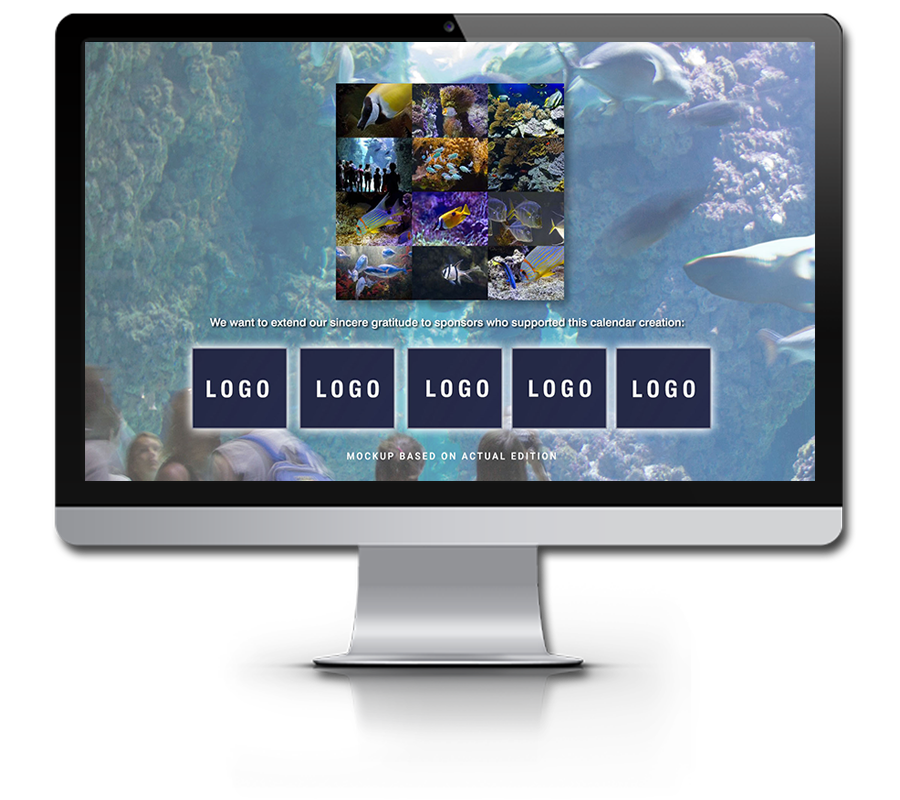
Illustraton for possible logo placements with a thank you note on a second calendar page
There are several ways to monetize your images. The simplest one is licensing your images to corporations for their own calendars, just as you would normally do through stock sites. What's different in this case is that you can propose using ePix Editions either as added value to their existing print editions or as a complete replacement — allowing them to move fully to digital creation and distribution.
Another way to monetize your work is by publishing your own ePix Edition — whether it's an ePix Wallpaper Calendar or an ePix Editions Mobile App — and offering ad spaces within the publication. In this case, you can use the same content for your own self-promotion while simultaneously generating income through sponsorships.
This approach is especially suitable for content creators, photographers, artists, museums, and galleries who can use an ePix Edition as part of a fundraising campaign, helping cover the costs of exhibition openings while also generating income for future projects.
Available Sponsorship Placements
Similar to paper calendars, an ePix Wallpaper Calendar can include an illustrated front page — essentially a digital cover page. This page should remain clean, ideally showing only the main illustration and the calendar title. A sponsor's name can be added as well, possibly even included in the title if you have licensed your work to that sponsor.
However, if you are the publisher yourself and you are offering sponsored content, logos with a thank‑you note, or even full‑page ads, you should place those on the second or third page of the calendar. In more extreme cases, you could include full‑page ads between some of the calendar images, but you should be careful with that. It's one thing to have a cover illustration and add a note or two on a second page to acknowledge who helped you publish your creation, but users may become annoyed if they are forced to see an ad every time they turn to a new page.
Sponsorship Placements in the Mobile App
Within the Mobile App, sponsored content can be placed on the first or last page of the edition, or inserted between regular content pages. Each page in the app is a full‑screen image accompanied by a short text describing what the user is seeing. When an ad is included, it appears as a full‑page item that the user encounters while swiping to the next image. As with the wallpaper calendar, these placements should be used carefully and kept unobtrusive to avoid disrupting the viewing experience.
You can see an example of this behavior demonstrated in the video below.
How to Add Ads to the ePix Editions Calendar or Mobile App
In the case of the ePix Wallpaper Calendar, everything you need can be done through the My ePix Authors Editions plug‑in. You can learn more about it on the Self-Publishing for Authors & SMBs page.
The mobile app is a bit more complicated, and for now we'll have to handle this part for you. The good news is that a dedicated app content builder is already in development and should be available before the end of the year.
